The latest Steam Deck Beta Client update enhances user experience with new home screen options, screensavers, and improved desktop mode functionality.
A significant update for the Steam Deck Beta Client has rolled out, inviting users to explore enhanced customization features that refine the overall user experience. One of the standout additions is the new "Big Art Mode," which transforms game artwork on the home screen by enlarging the visuals, creating a console-like atmosphere that’s visually appealing and engaging. This new emphasis on aesthetics aligns with a broader trend in gaming toward creating immersive environments that capture users' attention from the moment they power on their devices.
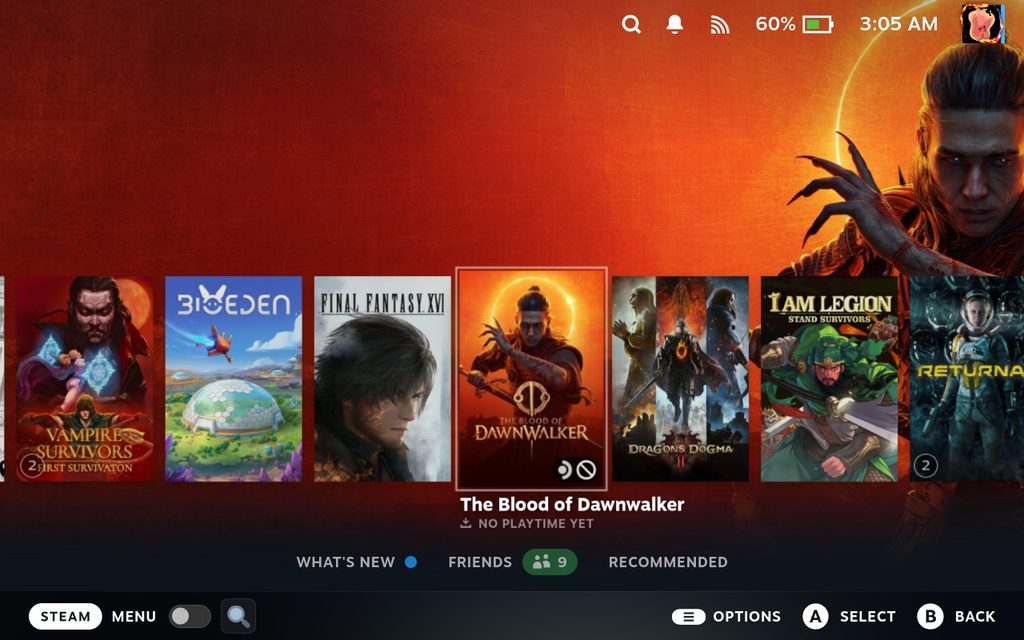
User-Centric Customization Features
Alongside this aesthetic enhancement, a new screensaver feature has been introduced. Users can now select a screensaver that activates after a designated period, fostering a more comforting atmosphere when the device is idle. Customization options abound; players can create personalized screensavers using artwork from played games or their own screenshots. For those who enjoy a touch of nostalgia, a retro-styled bouncing logo screensaver adds flair to the device. This choice keeps users engaged even when not actively gaming, enhancing the personalized experience that modern gamers often crave in their devices.
Practical Changes to Enhance Workflow
Another key improvement is the newly implemented "Default to Desktop Mode" toggle located in system settings. While it may seem minor, this feature allows users who utilize their Steam Deck as a PC to start directly in Desktop Mode, streamlining the transition from gaming to general computer tasks. This functionality illustrates Valve’s understanding of its user base, many of whom view the Steam Deck as more than just a gaming console—it’s a versatile, portable gaming PC. Having quick access to desktop functionality without unnecessary navigation boosts convenience, ultimately allowing for a more fluid user experience.

Smart Notifications and Calendar Integration
The update also enhances the home screen experience by integrating the Personal Calendar into the Recommended tab, making scheduling easy for users. That’s significant: as more gamers embrace their devices for multi-tasking, the ability to keep track of events and reminders directly within the gaming interface blurs the lines between gaming and productivity. Moreover, new notifications clarify actions like confirming VR exits and identifying the current user when waking the device. This is particularly useful in households with multiple users, where clarity can often be a hassle. These changes are subtle yet impactful, emphasizing a shift towards a more integrated lifestyle.
Performance Enhancements for an Improved Experience
In addition to these user-interface enhancements, efficiency upgrades have been made to Steam Input, marking improved CPU performance during runtime and when loading configurations. This alteration will undoubtedly improve the gameplay experience for users engaging with various titles. Users can expect smoother performance across games, which increasingly require reliable input management for complex controls and commands. If you’re invested in competitive or immersive gaming, you’ll appreciate these subtle yet critical improvements.
Furthermore, the beta update addresses several bugs within the SteamRT3 Experimental Beta client, including fixes for performance overlays and issues encountered with non-Steam games. These changes reflect ongoing efforts to refine the Steam Deck’s functionalities, ensuring that users can enjoy the platform's capabilities without hitches. The emphasis on debugging is noteworthy, as it showcases Valve's commitment to delivering a polished experience, a principle that too often gets overlooked in the rush to roll out new features.
If you're eager to try these features, you can download the latest update through the System Settings on your Steam Deck. Just ensure your update channel is set to Beta or Preview to access these new customization options. The convenience of constant access to fresh updates has become an expected norm; users should embrace these advancements for a more tailored gaming experience.
Future Implications and Community Response
The recent updates not only enhance the Steam Deck's customization options but also touch on essential performance enhancements. This bodes well for a community that is eager for improvements. The continual focus on refining user experience shows that Valve isn't just resting on its laurels; rather, it’s actively engaging with customer feedback. In gaming culture, this responsiveness matters significantly, as it fosters loyalty and trust.
What's fascinating is the potential ramifications of these updates on competing devices. The handheld gaming sector is intensifying, with several companies vying for consumer attention. Valve's emphasis on user-centric design and functionality could set a standard that others may feel compelled to follow. And yet, the degree to which these changes resonate with users will ultimately depend on how seamlessly they can integrate into existing gaming habits. For the foreseeable future, Valve's approach suggests that the Steam Deck could remain a relevant player in the shifting dynamics of portable gaming.
Discussion
Sign in to join the discussion.